How to film a text conversation
Which method fits the scene, how long people need to read, and how to keep every take matching.
Shoot the phone when the phone itself carries the drama: a hand hesitating, a message arriving at the worst moment. Float the text on screen when the actor's face carries it. Replace the screen in post when it has to look like a real phone but the words might still change. Rarely have a character read a text aloud.
| Method | Best when | Watch out for |
|---|---|---|
| Insert of the phone | The phone as an object matters | Each insert stops the scene while people read |
| Floating text | The reaction matters more than the screen | Designs that copy a real app and date fast |
| Replace in post | It must look real, but the words aren't final | Tracking and cutting around fingers |
| Read aloud | A comic or diary-like tone | It rarely sounds like a real person |
Why the cut to a phone feels slow
In his video essay A Brief Look at Texting and the Internet in Film, Tony Zhou put it bluntly: “Every time a filmmaker cuts to an insert of a phone you can hear the audience yawning.” Cutting from face to phone and back is slow, because the phone has to stay on screen long enough to read. Floating the text next to the actor shows the message and the reaction in one frame.
Inserts still work when the phone is the point. In Personal Shopper, a long stretch of the film is a woman on a train trading texts with a stranger, mostly shot on the phone in her hand. Olivier Assayas said he rebuilt her reaction from the pace the messages came in. The rhythm of arriving texts became the edit.
How long to hold a text on screen
Netflix's subtitle rules assume adults read up to 20 characters a second, and never show a subtitle for less than 20 frames. A text on a phone is harder than a subtitle: the viewer has to find it in the frame first, with no dialogue to help.
Our rule of thumb: count the characters, divide by 15, and add a second. “where are you. i'm outside” is 26 characters, so hold it for about 2.7 seconds. It's a starting point, not a standard, so check it on someone who hasn't read the script.
- Keep messages short. Under about 42 characters, one subtitle line, reads in a glance. Real texts are short anyway.
- Make the letters big enough. French advertising guidance for on-screen text asks for letters at least 2% of the picture's height, about 22 pixels in a 1080p frame. Many people will watch your film on a phone, so check the export on one.
Typing on camera
People type on phones at about 36 words a minute, roughly three characters a second. That's about six times slower than viewers read, so a message typed out in real time drags. Show the first few letters, then cut to the sent message. Let the typing run long only when the slowness is the point: hesitating, deleting, starting again.
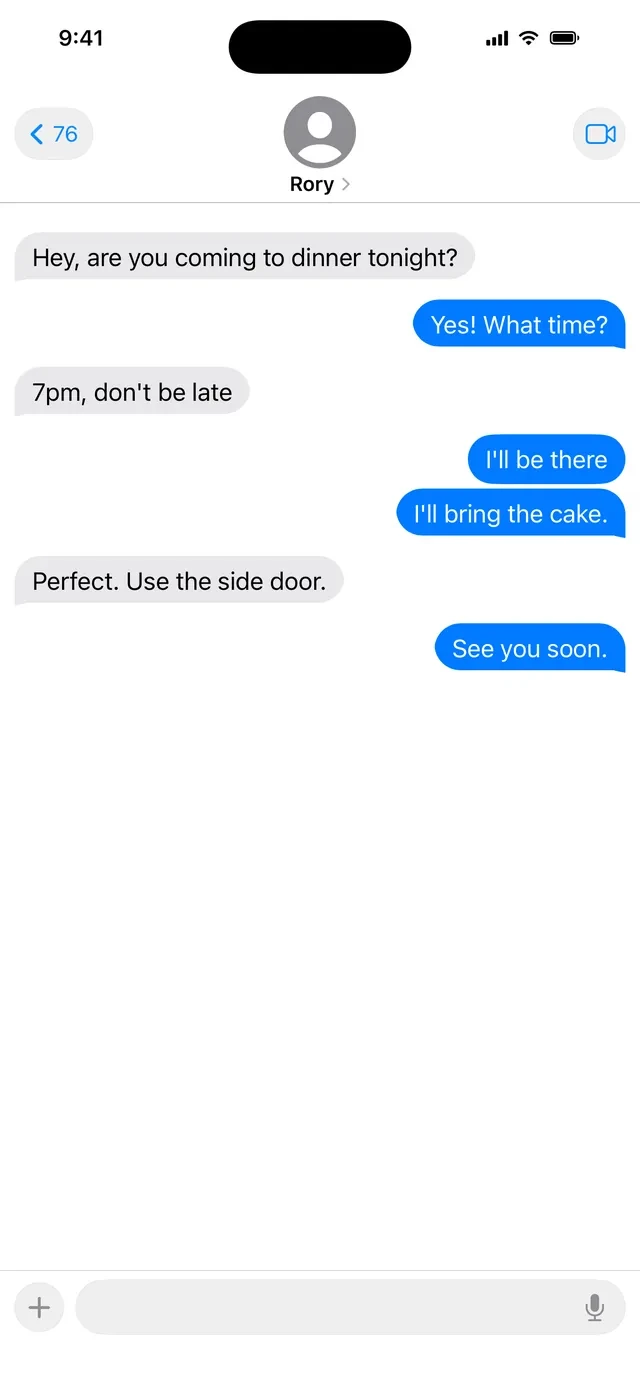
Shooting the insert
Getting close enough
Use a macro lens, a long lens that focuses close, or a close-up diopter. Cinematographers on the CML forum suggest stopping down to around T/11 with a diopter and fixing the phone to a stand so it stays in focus. At that distance, the sharp zone is millimeters deep. A shallow look is fine on one word or a name, but stop down when the whole message has to be read.
The polarizer that blacks out the screen
Phone screens give off polarized light, so a polarizing filter used to cut glare can turn the screen black, depending on how it's turned. Test it on your phone, or kill reflections by moving the light and the camera instead.
Moiré is not flicker
Wavy patterns over the screen come from the grid of pixels lining up with the camera sensor. Change the distance or angle, or defocus a touch. Flicker and rolling bands are a timing problem, fixed with shutter and brightness. The phone call guide covers those, along with True Tone, Night Shift, and brightness.
If you'll replace the screen later
A VFX artist writing for ProVideo Coalition prefers a dark screen over a green one, because the real reflection on the glass is worth keeping. If the corners of the phone are visible, you often need no tracking markers at all.
Floating text that won't date
Zhou's breakdown of Sherlock is still the best set of rules:
- No bubble. “The bubble is the first thing that becomes outdated.”
- One font, one color, the same through the whole film.
- No sender name. The audience works out who sent it, which pulls them in.
- Float it near the phone, not stuck to it.
Copying a real app has a cost. Frame.io points out that The Mindy Project copied the Windows Phone design, which looked dated once that phone was gone. Keep each person's messages on the same side of the frame for the whole scene, the way you'd keep eyelines.
Keeping the thread the same in every take
Every take has to show the same messages in the same order, with the same time in the status bar. Real phones make that hard: each new message moves the thread, and the clock keeps running.
- Script the thread before the shoot, and reset it between takes. In Understudy you write each message as incoming or outgoing, and Reset Scene puts every conversation back to the script.
- Freeze the clock at your story's time, not whatever time you happen to be shooting.
- Match the insert to the wide: same phone and case, same hand, same nails and rings if you use a hand double.
- Photograph the screen at each setup for continuity.
Searching, a feature told entirely on screens, went further: its editors spent seven weeks building a full mock-up of the film before the shoot, so the actors knew exactly what was on screen. A rough version of your conversation, timed out before the shoot, does the same job at indie scale.
Writing it in the script
There's no single standard. Final Draft suggests an action line like MAYA'S TEXT READS: with the message below it, and keeping dialogue blocks for spoken lines. No Film School suggests (TEXT) after the character name for long exchanges. Whatever you pick, use INSERT for a phone shot and SUPER for floating text, so your DP and editor know which one you mean.
Apps, names, and numbers
A plain messaging look of your own, with no app name or logo, avoids two problems: it won't date, and it won't raise clearance questions. If you do want WhatsApp on screen, Meta asks productions to request permission and send the final cut, and review takes two to three weeks. Use first names for contacts, and if a number shows, keep it in 555-0100 to 555-0199.
On-set checklist
Screenshot this or print it.
- Method picked for each beat: insert, floating text, or replace in post.
- Every message under 42 characters, and held for characters ÷ 15 + 1 second.
- Thread scripted and reset to the same place before every take.
- Clock frozen at the story's time.
- Polarizer tested on this phone, or left off.
- Focus checked on the whole message, not just one word.
- Hand, phone, and case match the wide shot.
- No real app name, logo, or number. Numbers in 555-0100 to 555-0199.
- Export checked on a phone for readability.